29.06.26
Guide to billing automation for insurance professionals

Billing automation is the process of using software to execute the entire billing cycle without manual intervention, from invoice generation through to payment reconciliation. For property and casualty insurers, this means replacing error-prone manual processes with a five-stage automated loop: trigger, calculate, generate, deliver, and reconcile. Each stage feeds directly into the next, eliminating the manual handoffs that cause revenue leakage and compliance risk. This guide to billing automation covers everything insurance professionals need to implement, manage, and sustain automated billing across their operations.
What is a guide to billing automation and why does it matter for insurers?
Billing automation in insurance is not simply about sending invoices faster. It is about replacing a fragmented, people-dependent process with a governed, rules-driven system that operates consistently at scale. European P&C insurers face particular pressure here: regulatory requirements around financial reporting, VAT treatment, and policyholder communication demand accuracy that manual billing cannot reliably deliver.
The billing automation process covers five core stages. The trigger stage initiates billing based on a policy event, such as renewal or endorsement. The calculate stage applies pricing rules, taxes, and fees. The generate stage produces the invoice document. The deliver stage sends it to the policyholder through the correct channel. The reconcile stage matches payments against open items and flags discrepancies. Full automation of all five stages eliminates the manual handoffs that most commonly cause errors and delays.

The business case is direct. Automated billing reduces revenue leakage by catching missed invoices and late payments before they become write-offs. It also reduces the administrative burden on finance teams, freeing staff to handle exceptions and complex cases rather than routine invoice production. For insurers managing thousands of policies, that shift in workload is material.
What prerequisites and tools do you need before automating billing?
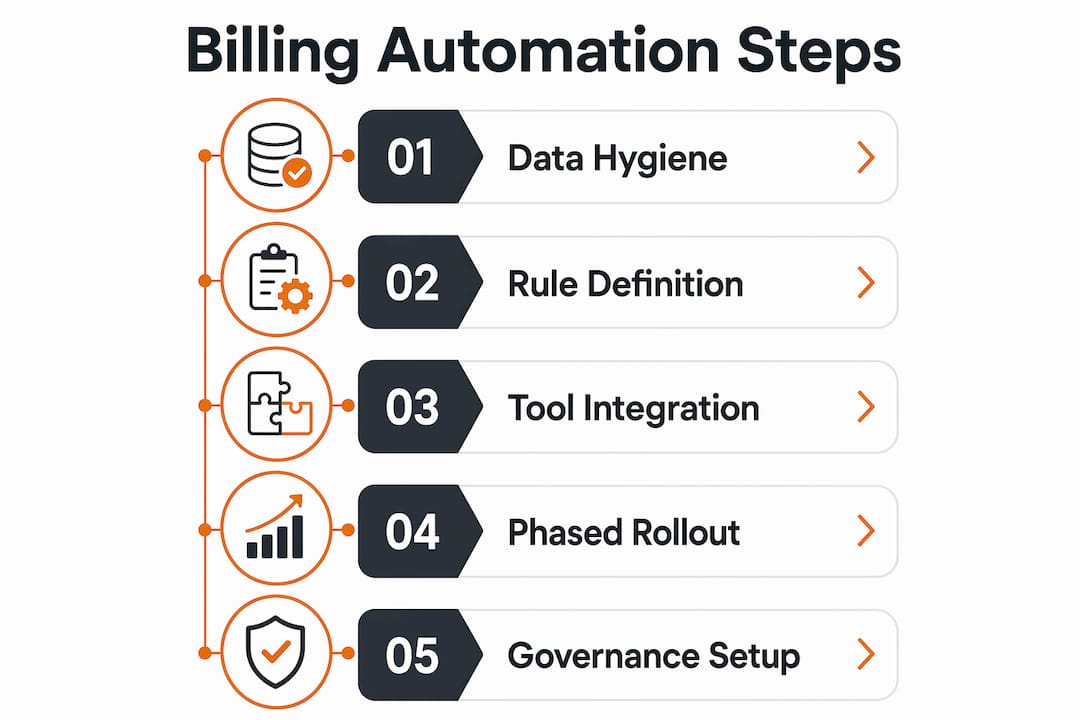
The most common reason billing automation projects fail is not poor technology. Billing problems stem from data and process issues rather than the software itself. Rules for pricing and triggers must be clearly mapped before any automation is deployed. Starting with the technology before the process is defined guarantees a difficult implementation.
Master data hygiene
Clean customer records are the foundation of any billing automation project. Every policyholder account must have an accurate billing contact, a valid tax identifier, and a confirmed payment method before automation goes live. Duplicate accounts and stale receivables must be removed. Ignoring master data hygiene before go-live leads to amplified errors post-launch, because automation executes at scale and a bad record produces a bad invoice every single cycle.
Defined billing rules and pricing models
Automation requires unambiguous rules. Every pricing model, instalment schedule, and fee structure must be documented and approved before it is encoded into the system. Ambiguous rules produce inconsistent invoices. Inconsistent invoices damage policyholder trust and create reconciliation problems downstream.
Tooling and integration requirements
The table below outlines the core feature categories insurers should evaluate when selecting billing automation tooling.
| Feature category | What to look for |
|---|---|
| Policy administration integration | Native API connection to your policy system to pull trigger events automatically |
| Rules engine | Configurable pricing, tax, and fee logic without requiring code changes |
| Dunning and escalation | Automated payment reminders with configurable escalation sequences |
| Exception handling | Ability to pause high-value or complex invoices for human review |
| Audit trail | Full logging of every billing action for regulatory and compliance purposes |
| Reporting and reconciliation | Real-time dashboards showing open items, collected amounts, and exceptions |
Integration with your existing insurance billing systems and CRM is non-negotiable. A billing tool that operates in isolation from policy administration creates the same data silos that manual billing produces. Cross-department alignment between finance, IT, and operations before project kick-off is equally critical. Without it, billing rules will be incomplete and the go-live will surface gaps that should have been resolved in design.
How to implement billing automation step by step
A phased approach is the most reliable path to a successful implementation. Enterprise billing automation delivers measurable results within 90 days when data hygiene and dunning sequences are prepared in advance. Attempting to automate every billing scenario at once increases risk and slows delivery.
Phase one: high-volume, simple tasks (days 1–30)
- Audit and cleanse master data. Remove duplicate accounts, update billing contacts, and confirm tax identifiers across all active policies.
- Map your billing triggers. Document every event that initiates a billing action: new business, renewal, endorsement, cancellation, and reinstatement.
- Configure recurring invoice generation. Starting with recurring invoices and payment reminders produces the highest immediate improvement in cash flow. These are high-volume, low-complexity tasks that validate your rules engine quickly.
- Set up dunning sequences. Configure automated payment reminders at defined intervals before and after the due date. Define escalation rules for overdue accounts.
- Test with a controlled subset. Run the automation against a sample of live policies before full deployment. Validate every output manually before go-live.
Phase two: incremental complexity (days 31–90)
- Introduce instalment billing. Add monthly and quarterly instalment schedules once recurring annual billing is stable.
- Automate endorsement billing. Configure mid-term adjustment billing for policy changes, applying pro-rata calculations automatically.
- Enable exception routing. Set thresholds above which invoices are held for human review before delivery. This is particularly important for commercial lines and high-value accounts.
- Connect reconciliation. Automate the matching of incoming payments against open invoices and configure alerts for unmatched items.
Pro Tip: Run a parallel billing cycle during phase two. Produce automated invoices alongside your existing manual process for two weeks and compare outputs line by line. Discrepancies reveal rule gaps before they reach policyholders.
Phase three: advanced automation (days 91 onwards)
Phased rollout focusing on high-volume renewals first builds stability and confidence before tackling complex cases. Phase three is where you introduce multi-entity contracts, bespoke pricing arrangements, and integration with financial sub-ledger systems. By this point, your team understands the system’s behaviour and can configure complex rules with confidence.
The table below compares basic and advanced billing automation capabilities to help you plan your phasing.
| Capability | Basic automation | Advanced automation |
|---|---|---|
| Invoice generation | Recurring, fixed-schedule invoices | Event-driven, mid-term, and multi-entity invoices |
| Payment reminders | Fixed-interval dunning sequences | Dynamic dunning based on payment history and risk profile |
| Reconciliation | Manual matching with automated alerts | Fully automated matching with exception routing |
| Approval workflows | None or manual | Rules-based routing for high-value and complex invoices |
| Reporting | Standard invoice and payment reports | Real-time financial dashboards with sub-ledger integration |
What common mistakes should you avoid during billing automation?
Partial automation is one of the most damaging outcomes an insurer can produce. When some billing tasks are automated and others remain manual, the handoff points between the two create bottlenecks and inconsistencies. Revenue leakage concentrates precisely at those handoffs.
The risks of poor governance are concrete. Poor automation causes brand damage through duplicate billing, incorrect tax calculations, and excessive reminder communications to policyholders. At scale, a single misconfigured rule can affect thousands of accounts simultaneously. The reputational cost of mass billing errors is difficult to recover from.
Common mistakes to avoid:
- Automating before rules are defined. Encoding ambiguous or incomplete billing logic produces inconsistent invoices from day one.
- Skipping data cleansing. Dirty data is amplified by automation. One duplicate account becomes hundreds of duplicate invoices.
- Removing human oversight entirely. Automation supports decision-making rather than replacing human judgement. High-value and complex invoices must route to a reviewer before delivery.
- Ignoring exception handling. Every billing system encounters edge cases. Without a defined exception process, unusual cases either fail silently or produce incorrect outputs.
- Treating go-live as the end. Billing rules change when products, pricing, or regulations change. Automation requires ongoing governance, not a one-time configuration.
“Automation should be designed to allow pausing of complex or high-value invoices for human review, ensuring control without slowing routine billing.” — Guide to Invoice Automation
A governance model that combines automated execution for routine invoices with mandatory human review for exceptions gives insurers the speed of automation without sacrificing control. This is the standard that European insurance financial regulators expect, and it is the model that protects both the insurer and the policyholder.
How do you maintain billing automation after go-live?
Billing automation is not a set-and-forget system. The rules that drive it must reflect current products, pricing, and regulations. A configuration that was accurate at go-live can become incorrect within months if it is not actively maintained.
Maintenance best practices for insurance billing teams:
- Audit customer data quarterly. Review billing contacts, tax identifiers, and payment methods on a defined schedule. Remove stale records and update changed details before they cause billing failures.
- Review billing rules after every product or pricing change. Any change to a premium structure, fee schedule, or instalment option must trigger a rules review. Do not assume existing configurations will handle new products correctly.
- Monitor exception queues daily. A rising volume of exceptions signals a rules gap or a data quality problem. Investigate promptly rather than allowing the queue to grow.
- Test dunning sequences after regulatory updates. European insurance regulators periodically update requirements around policyholder communication. Dunning sequences must comply with current rules on frequency, content, and timing.
- Hold cross-functional reviews monthly. Finance, IT, and customer operations must review billing performance together. Each team sees different failure signals, and a combined review catches problems that siloed monitoring misses.
Pro Tip: Create a billing rules register: a single document that records every configured rule, its business rationale, and the date it was last reviewed. When a billing error occurs, the register tells you exactly which rule to examine first.
Maintaining compliance with European insurance financial standards requires particular attention to VAT treatment, policyholder statement formats, and payment allocation rules. These requirements vary by market and change over time. Build regulatory review into your annual billing governance calendar rather than treating it as an ad hoc task. For a broader view of how digital billing practices are reshaping insurer operations, the underlying principles of governance and data integrity apply equally to maintenance as they do to implementation.
Key takeaways
Billing automation delivers consistent, accurate invoicing at scale only when built on clean data, clearly defined rules, and active governance throughout its lifecycle.
| Point | Details |
|---|---|
| Define rules before deploying technology | Map every billing trigger, pricing model, and fee structure before configuring any automation. |
| Cleanse master data first | Remove duplicates and update all billing contacts and tax IDs before go-live to prevent errors at scale. |
| Phase your implementation | Start with high-volume recurring invoices, then add complexity incrementally over 90 days. |
| Maintain human oversight for exceptions | Route high-value and complex invoices to a reviewer; automation handles routine billing, not every case. |
| Govern continuously post-launch | Audit data quarterly, review rules after every product change, and hold cross-functional billing reviews monthly. |
Billing automation in insurance: what experience actually teaches you
The most persistent misconception I encounter is that billing automation is primarily a technology problem. Insurers invest in a platform, configure it over several months, and then discover that the real obstacles were process gaps and data quality issues that existed long before the software arrived. Technology does not fix a poorly defined billing process. It executes that process faster and at greater scale, which means it also amplifies the errors within it.
The insurers who implement billing automation most successfully treat the project as a process redesign first and a technology deployment second. They spend the first month not configuring software but mapping every billing scenario, resolving ambiguities in pricing rules, and cleaning their customer data. That groundwork feels slow. It pays back immediately after go-live.
The other lesson that experience reinforces is the value of phased delivery. Insurance billing is genuinely complex. Multi-entity commercial contracts, mid-term endorsements, and bespoke instalment arrangements each introduce edge cases that simple recurring billing does not surface. Attempting to automate all of it simultaneously is how projects stall. Starting with the highest-volume, simplest scenarios builds team confidence and system stability before the hard cases arrive.
Finally, governance is not optional. The insurers who treat post-launch governance as a formality are the ones who call me twelve months later with a billing error affecting thousands of policyholders. A monthly cross-functional review and a quarterly data audit are not bureaucratic overhead. They are the mechanism that keeps automation accurate as products, pricing, and regulations change around it.
— Tuna
How IBSuite supports billing automation for P&C insurers
Ibapplications built IBSuite to cover the full insurance value chain, which means billing automation is not a bolt-on feature but an integrated part of the platform. IBSuite’s policy administration capabilities connect directly to billing, so policy events automatically trigger the correct billing actions without manual intervention. The platform supports configurable billing rules, dunning sequences, exception routing, and financial sub-ledger integration within a single governed environment. For P&C insurers looking to move beyond fragmented billing processes, IBSuite provides the data integrity and rules engine that successful automation requires. Contact Ibapplications to book a demonstration and see how IBSuite handles your specific billing scenarios.
FAQ
What is billing automation in insurance?
Billing automation in insurance is the use of software to execute the full billing cycle automatically, covering invoice generation, delivery, payment collection, and reconciliation without manual intervention at each stage.
How long does billing automation implementation take?
Enterprise billing automation delivers measurable results within 90 days when data hygiene and dunning sequences are prepared before go-live. Complex scenarios such as multi-entity contracts typically require a longer phased rollout beyond the initial 90 days.
What should I automate first in the billing process?
Recurring invoice generation and payment reminders are the highest-impact starting points. They are high-volume, low-complexity tasks that validate your rules engine and produce immediate cash flow improvements.
How do I prevent billing errors at scale?
Clean master data before go-live, define all billing rules unambiguously, and configure exception routing so high-value or complex invoices are held for human review. Governance and approval workflows are the primary safeguard against errors affecting large numbers of policyholders simultaneously.
Does billing automation replace finance staff?
Billing automation does not replace finance staff. Automation supports decision-making by handling routine invoicing, freeing finance teams to focus on exceptions, disputes, and complex cases that require human judgement.
Recommended
- Billing automation guide: streamline insurance operations
- What is insurance billing automation? P&C benefits 2026
- How to streamline billing operations for insurance efficiency
- Insurance Billing Processes Explained: Complete Guide – Digital Insurance Platform | IBSuite Insurance Software | Modern Insurance System