10.07.26
Insurance CRM best practices: a 2026 guide for insurers

Insurance CRM best practices are the methods that help insurers manage client relationships, track policy lifecycles, and run compliant, efficient operations from a single connected platform. The industry term for this discipline is customer relationship management, though in insurance it extends well beyond contact management to cover claims integration, consent tracking, and regulatory compliance. European insurers that apply these practices correctly report measurable gains in retention, processing speed, and data quality. This guide covers the core features, implementation steps, automation strategies, and governance frameworks that make the difference between a CRM that sits unused and one that drives real business value.
What are the essential features of an effective insurance CRM?
An effective insurance CRM does more than store contact details. It tracks the full policy lifecycle, from initial quote through renewal and claims, giving every team member a single, accurate view of each client. Without that foundation, advisors work from incomplete information, and clients receive inconsistent service.
The core features every insurance CRM needs include:
- Policy lifecycle tracking: The system must record every policy event, including inception, endorsement, renewal, and lapse, with timestamps and responsible parties.
- Claims management integration: Advisors need real-time visibility into open claims. A CRM that cannot connect to the claims platform forces staff to switch between systems, which slows response times and creates errors.
- Consent and compliance tracking: GDPR requires insurers to record exactly when and how a client gave consent for each type of communication. The CRM must store this data and make it auditable.
- Multi-country data architecture: European insurers operating across borders need a data model that handles multiple currencies, languages, and regulatory regimes without duplicating records.
- Automated task and workflow management: Renewal reminders, follow-up calls, and document requests should trigger automatically based on policy dates or client events.
Customisation matters as much as the feature list. A CRM built for retail sales will not map naturally to insurance workflows. Insurers should configure the system to reflect their own underwriting stages, product lines, and regional compliance requirements before going live. The table below summarises the key feature categories and their primary business purpose.
| Feature category | Primary business purpose |
|---|---|
| Policy lifecycle tracking | Single view of all policy events per client |
| Claims integration | Real-time claims status for advisors and clients |
| Consent management | GDPR-compliant audit trail for all communications |
| Multi-country data model | Consistent records across European markets |
| Workflow automation | Reduces manual tasks and speeds up client responses |
Pro Tip: Map your existing insurance workflows on paper before configuring the CRM. Every field you add without a clear workflow purpose becomes clutter that slows adoption.
How to plan and execute a successful CRM implementation
CRM projects in insurance fail most often because they are designed around theoretical processes rather than the workflows people actually use. Low adoption rates correlate directly with missing end-user input during design. The fix is straightforward: involve the people who will use the system before a single configuration decision is made.
A structured implementation follows these steps:
- Define clear objectives. Decide what the CRM must achieve in measurable terms. Examples include reducing renewal lapse rates, cutting policy change processing time, or achieving full GDPR audit coverage. Vague goals produce vague outcomes.
- Assemble a cross-functional team. Include sales, underwriting, claims, compliance, and IT from the start. Compliance teams in particular must be present early. Legal and compliance teams involved from the outset prevent costly rework caused by data residency and GDPR complexities discovered late in the project.
- Prepare and cleanse your data. Migrating dirty data into a new CRM simply moves the problem. Deduplicate client records, standardise address formats, and validate policy numbers before migration begins.
- Phase the rollout. Start with one product line or one country. Prove the model works, gather feedback, and then expand. A phased approach reduces risk and builds internal confidence.
- Train local champions. Appointing regional CRM champions and providing market-specific quick-start guides increases user engagement and adoption across European offices. Champions answer day-to-day questions and surface issues before they become problems.
- Test thoroughly before go-live. Run parallel operations for at least two weeks. Compare outputs from the old and new systems to catch discrepancies in policy data or client records.
Pro Tip: Build a feedback loop into the first 90 days post-launch. A monthly review with end users surfaces friction points early and shows staff that their input shapes the system.
The step-by-step guide for P&C leaders from Ibapplications covers each of these phases in detail, including data migration checklists specific to property and casualty insurers.
Which automation and integration strategies deliver the best returns?
Automation is where insurance CRM strategies generate the clearest financial returns. Insurers using cloud-native platforms with integrated CRM reduce processing times by up to 40% and cut infrastructure costs by 30%. Those are not marginal gains. They reflect a fundamental shift in how work gets done.

The highest-value automation targets are high-frequency, low-complexity client requests. Policy address changes, payment method updates, and certificate requests are processed dozens of times daily. Automating these frees advisors to handle complex queries that genuinely require human judgement. One European insurer automated 10 of 19 standard request types, completing key client requests within two minutes. That speed is only possible when the CRM connects directly to the policy administration system.
Integration: the difference between a CRM and a connected platform
A CRM used only by the marketing team is a contact database, not a business tool. True insurance CRM value comes from bidirectional integration with core policy and claims systems. When a claim is logged in the claims platform, the CRM should update the client record automatically and trigger a follow-up task for the assigned advisor. When a policy renews, the CRM should generate a personalised communication without manual intervention.
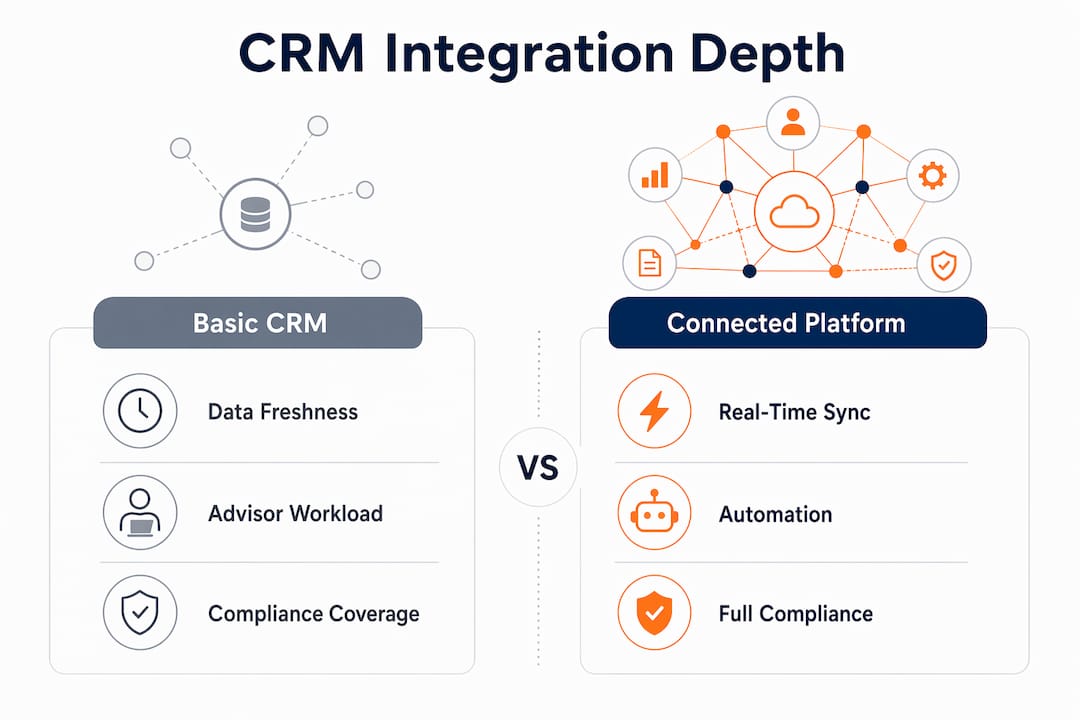
For insurers operating across multiple European markets, middleware is the practical answer to integration complexity. Centralised middleware layers handle currency conversion, tax rules, and multilingual content from a single point, avoiding the maintenance burden of point-to-point connections between each country’s systems. Cloud-native platforms built on infrastructure such as AWS provide the scalability to support this architecture without large upfront capital costs. The advantages of cloud-native platforms for P&C insurers include faster deployment cycles and built-in redundancy that on-premise systems cannot match.
The comparison below shows how integration depth affects operational outcomes.
| Integration level | Client data freshness | Advisor workload | Compliance coverage |
|---|---|---|---|
| CRM only, no integration | Updated manually | High, duplicate entry | Partial, gaps in audit trail |
| One-way feed from policy system | Updated daily or weekly | Moderate | Improved but incomplete |
| Bidirectional, real-time integration | Updated instantly | Low, automated triggers | Full, end-to-end audit trail |
Pro Tip: Start automation with the three highest-volume client request types in your business. Early wins build internal support for the broader programme and demonstrate ROI within the first quarter.
How to maintain data quality, governance, and compliance in insurance CRM systems
Data governance is not a project phase. It is an ongoing discipline that determines whether the CRM remains trustworthy six months after go-live. Implementing GDPR-compliant standardised regional data governance delivers 300% ROI for insurance firms. That figure reflects the cost of avoiding regulatory fines, rework, and client trust damage rather than a single efficiency gain.
Effective governance in an insurance CRM rests on four practices:
- Standardise consent recording. Every opt-in and opt-out must be timestamped, linked to the specific communication type, and stored in a format that can be exported for a regulatory audit within hours, not days.
- Automate data retention rules. GDPR sets limits on how long personal data can be held. The CRM should enforce retention schedules automatically, archiving or deleting records when the period expires rather than relying on manual reviews.
- Monitor data quality continuously. Set up automated checks for duplicate records, missing policy references, and invalid contact details. Run these checks weekly and assign ownership to a named data steward in each market.
- Audit regularly and act on findings. A quarterly audit that produces a report nobody reads is worthless. Assign a named owner to each finding and track resolution in the CRM itself.
The CRM should also serve as the single source of truth for client identity. When the same client holds a motor policy, a home policy, and a commercial policy, all three records must link to one master profile. Fragmented records produce fragmented service, and fragmented service drives churn. Treating the CRM as a single trusted customer profile before layering automation on top is the correct architectural sequence. Build the foundation first, then add intelligence.
Key takeaways
Effective insurance CRM depends on deep integration with core systems, disciplined data governance, and user involvement from day one.
| Point | Details |
|---|---|
| Integration drives real value | Bidirectional CRM integration with policy and claims systems enables real-time updates and automated client communications. |
| Governance delivers measurable ROI | GDPR-compliant data governance in European insurance CRM projects generates 300% ROI by reducing risk and rework. |
| Automation targets high-volume tasks first | Focus initial automation on simple, frequent requests to demonstrate early wins and build internal momentum. |
| User involvement prevents failure | CRM projects fail when end users are excluded from design. Involve advisors, compliance staff, and local champions early. |
| Cloud-native platforms reduce costs | Cloud-native CRM infrastructure cuts processing times by up to 40% and infrastructure costs by up to 30%. |
Where most insurance CRM projects go wrong
I have seen well-funded CRM projects collapse within 18 months, and the cause is almost never the technology. The pattern repeats: a senior team selects a platform, IT configures it based on a process document, and the system goes live without meaningful input from the advisors and compliance officers who will use it daily. Adoption stalls. Workarounds appear. The CRM becomes a parallel system that nobody trusts.
The fix I keep coming back to is deceptively simple: treat the CRM as a product, not a project. Products have owners, user feedback cycles, and iterative releases. Projects have end dates. Insurance CRM needs the former mindset because the regulatory environment, the product range, and the client base all change continuously.
The other mistake I see regularly is treating automation as a destination rather than a tool. Insurers sometimes automate every process they can identify, then wonder why advisors feel disconnected from clients. Automation should handle the transactional work so that people can focus on the relational work. A policy change processed in two minutes is impressive. An advisor who uses that freed time to call a client about an upcoming renewal is where the real retention value sits.
The CRM workflow guide for P&C firms from Ibapplications addresses this balance directly, with practical frameworks for deciding which processes to automate and which to keep human. If you are mid-implementation and feeling the pressure to automate everything at once, that guide is worth reading before your next sprint.
— Tuna
How Ibapplications supports insurance CRM implementation
Ibapplications builds IBSuite, a cloud-native platform that covers the full insurance value chain, including a CRM module that connects directly to policy administration, claims, billing, and rating. For European P&C insurers, that means a single platform rather than a collection of integrated point solutions. The CRM within IBSuite supports GDPR consent management, multi-country data models, and real-time policy event triggers out of the box. Insurers looking to understand how the platform fits their specific workflows can book a personalised demo with the Ibapplications team. The session covers configuration options, integration architecture, and typical implementation timelines for firms at different stages of digital maturity.
FAQ
What is insurance CRM?
Insurance CRM is a customer relationship management system configured for insurance workflows, covering policy tracking, claims visibility, consent management, and client communications from a single platform.
Why do insurance CRM projects fail?
CRM projects in insurance most often fail because end users are excluded from the design process, resulting in systems that do not reflect real operational workflows and therefore see low adoption.
How does CRM integration with claims systems help insurers?
Bidirectional integration means that when a claim is logged, the CRM updates the client record instantly and triggers advisor follow-up tasks, removing manual steps and improving response times.
What does GDPR compliance require from an insurance CRM?
The CRM must record timestamped consent for each communication type, enforce data retention schedules automatically, and produce a full audit trail that can be exported for regulatory review.
How quickly can automation deliver results in an insurance CRM?
Focusing initial automation on the highest-volume client request types typically produces measurable results within the first quarter, with some European insurers completing standard requests within two minutes of implementation.
Recommended
- Effective insurance CRM: a step-by-step guide for P&C leaders
- Insurance Customer Experience: Complete Guide for 2025 – Digital Insurance Platform | IBSuite Insurance Software | Modern Insurance System
- Insurance CRM workflow guide for P&C firms: cut costs 65%
- Insurance CRM optimisation steps to boost efficiency